The Perfect Photo for Face Shape Analysis
Ever uploaded a selfie to a face shape detector and gotten a completely different result than last time? The problem usually isn't the tool, it's the photo. Get these few details right, and you'll have a clean, accurate read in under a minute.
Why Your Photo Matters More Than You Think
Whether you're using an AI Face Shape detector or measuring manually, both methods rely on reading the same key points on your face: your forehead width, cheekbone width, jawline width, and overall face length. Anything that distorts how those points appear in a photo, a tilted head, harsh shadows, hair covering your jaw, or a wide-angle lens throws off the measurements before any analysis even begins. That's why two photos of the exact same person can produce two different face shape results. The good news is that every one of these variables is fully within your control and takes no special equipment to fix. Once your photo setup is right, your result becomes far more consistent and far more trustworthy.
The Perfect Photo Checklist (Quick Reference)
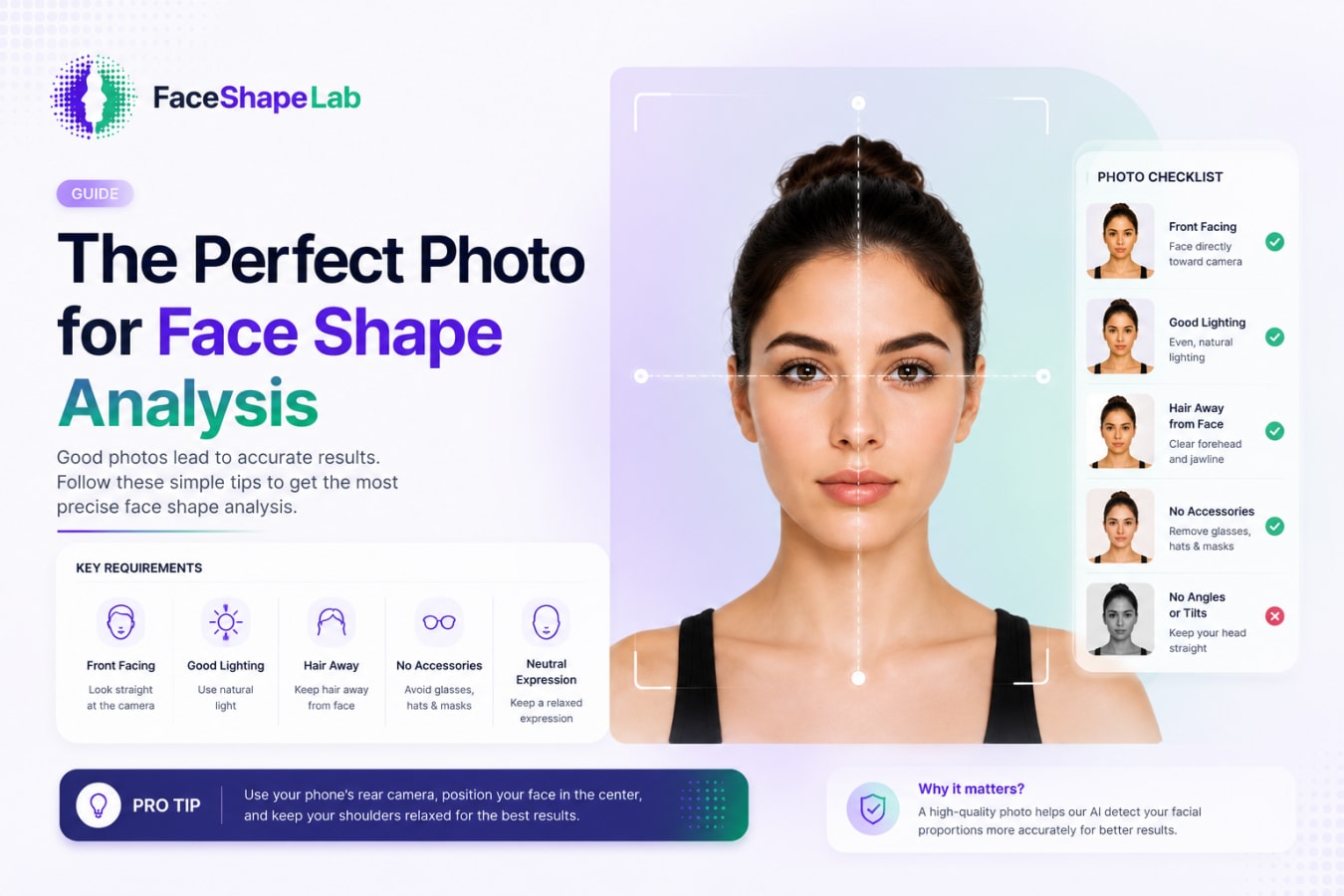
Use this checklist before you snap your photo or upload one for analysis:
Camera: Use the rear camera at 1x zoom avoid the front-facing selfie camera
Distance: Hold the phone at arm's length, or about 3 feet away
Angle: Eye level, head straight no tilting up, down, or sideways
Lighting: Even, front-facing light with no harsh shadows on either side
Hair: Pulled back completely from your forehead, temples, and jawline
Expression: Neutral and relaxed no smiling or raised eyebrows
Filters: Turned off disable beauty mode, Smart HDR, or auto-retouching
Check off each item before you take or upload your photo, and you'll get the most reliable face shape result possible.
Camera Setup: Front vs. Rear Camera (and Why It Matters)
Front-facing cameras use a wider-angle lens, and since your face sits just inches away, that distortion makes your nose look bigger and your face appear rounder or wider than it really is which can throw off your face shape result. The fix: use your rear camera at 1x zoom, held at arm's length or about three feet away, for a more natural, undistorted shot.
For the cleanest result, set your phone on a tripod and use the timer, or have someone else take the photo for you.
Head Position and Angle
Keep your head straight and your camera at eye level not tilting up, down, or to either side. A vertical tilt (chin up or down) distorts your face length, making it look shorter or longer than it really is. A horizontal turn distorts width, making one side of your forehead, cheek, or jaw appear wider than the other. Even a small 10–15 degree shift in either direction is enough to skew your result, so look straight into the lens and keep your chin level.
Lighting: Getting an Even, Shadow-Free Shot
Use soft, front-facing light from a window or a diffused overhead light both work well. Avoid harsh side-lighting or a single light source, since this creates shadows that make one side of your face look narrower or more angular than it actually is.
Quick tip: check your phone's live preview before you shoot. If one side of your face looks noticeably darker than the other, reposition yourself or your light source until both sides are evenly lit.
Hair, Expression, and Accessories
Pull your hair completely back from your forehead, temples, and jawline so all three are clearly visible. Keep your expression neutral and relaxed, no smiling or raised eyebrows, since both shift your cheek and jaw position.
If possible, remove glasses, hats, and bulky accessories before your photo, as they can hide or distort the edges of your face. Facial hair is trickier to control, but keep in mind it can add visual bulk to the jawline and may shift your result slightly toward a squarer or more oblong shape than your underlying bone structure.
Common Photo Mistakes to Avoid
A quick recap of the biggest culprits behind inconsistent results:
Close-up selfies — wide-angle lens distortion skews your proportions
Beauty filters or Smart HDR — smooths and reshapes facial contours automatically
Dim or backlit rooms — hides your true outline in shadow
Tilted head — distorts face length or width depending on direction
Hair covering your jawline or forehead — hides the exact edges being measured
Avoid these five, and you've already solved most accuracy issues before they happen.
What to Do If You Can't Get a Perfect Photo
Don't have ideal lighting or a tripod on hand? Take two or three photos under slightly different conditions, a different room, time of day, or angle and see if you get a consistent result across them. If the same shape (or the same two blended shapes) keeps showing up, that's a strong signal you can trust.
A "good enough" photo won't always be pixel-perfect, but it's still useful. Even an imperfect shot will usually point you in the right direction, especially once you cross-check it against a second or third photo.
Run Your Photo Through Face Shape Lab
Once your photo is ready, upload it to Face Shape Lab to get your result. The tool detects key facial landmarks: your forehead, cheekbones, jawline, and chin then calculates the ratios between them and matches your proportions to the closest face shape. You'll get your result in seconds, often with a confidence score if your face blends two shapes. After all the setup work, this is the easy part.
Final Thoughts
Getting an accurate face shape result really comes down to one thing: a clean, undistorted photo. Once you've got the right camera, angle, lighting, and hair setup, the analysis itself takes care of the rest. Don't stress over getting it flawless on the first try; even a couple of "good enough" attempts can confirm your shape. With your photo ready, you're all set to upload it to Face Shape Lab and get your result in seconds. From there, the fun part begins: finding the styles that actually work for you.
FAQs
1. Can I use a selfie for face shape analysis?
You can, but it's not ideal that front-facing cameras use a wider-angle lens that can distort your features at close range. If you do use a selfie, hold the phone at arm's length and use portrait mode or a rear-camera setup if your phone allows it.
2. Does makeup or contouring affect face shape results?
Yes, to some degree. Heavy contouring can create the illusion of more (or less) defined cheekbones and jawline, which may shift your result slightly. For the most accurate read, use a photo with minimal makeup or natural, light coverage.
3. Why do I get different results from different photos?
Small differences in angle, lighting, expression, or distance can all change how your facial proportions appear. This is normal taking a few photos under consistent, ideal conditions usually resolves the inconsistency.
4. Does facial hair affect face shape detection?
Yes. A beard or heavy facial hair adds visual bulk along the jawline, which can make your face appear squarer or more angular than your actual bone structure. If you want the most accurate read, a closely trimmed or clean-shaven photo works best.
5. How many photos should I test for an accurate result?
Two to three photos taken under slightly different conditions (lighting, time of day, or angle) is usually enough. If the same shape or the same blend of two shapes keeps showing up, you can trust that result.